
If you ride the buses in Abu Dhabi, you already know the drill. Tap in, tap out, and pray your Hafilat card is sufficiently loaded. Running out of balance at the bus stop in the summer morning is no fun, and standing in a queue at a ticket machine is a waste of time you probably do not have.
The good news is that you don’t need a machine at all anymore. You can recharge your Hafilat card online in less than two minutes through the official DARB website, the Darbi mobile app, or the Payit wallet. This guide by Ever List takes you through each method step-by-step, covers payment options and requirements, and explains the small rules that catch people out, such as the AED 150 balance cap and the three-month validity window.
All of this is from the official Abu Dhabi Mobility (formerly the Integrated Transport Center) channels, so you can follow along with confidence.
What You Need Before You Start
Before opening any app or website, have two things ready.
- Your card serial number (16 digits). It is on the back of your Hafilat Card. If you get one digit wrong, the system won’t recognize the card. People often confuse the number 0 with the letter O.
- Second, a payment method. You can pay for online recharges using credit card and debit cards and, depending on the platform, also using Apple Pay, Google Pay or the balance of your Payit wallet.
That’s it. You don’t need an account for a basic website recharge, but creating one on DARB allows you to save your card, see trip history and set up auto top-ups.
Method 1: Recharge Through the Official Hafilat Website (hafilat.darb.ae)
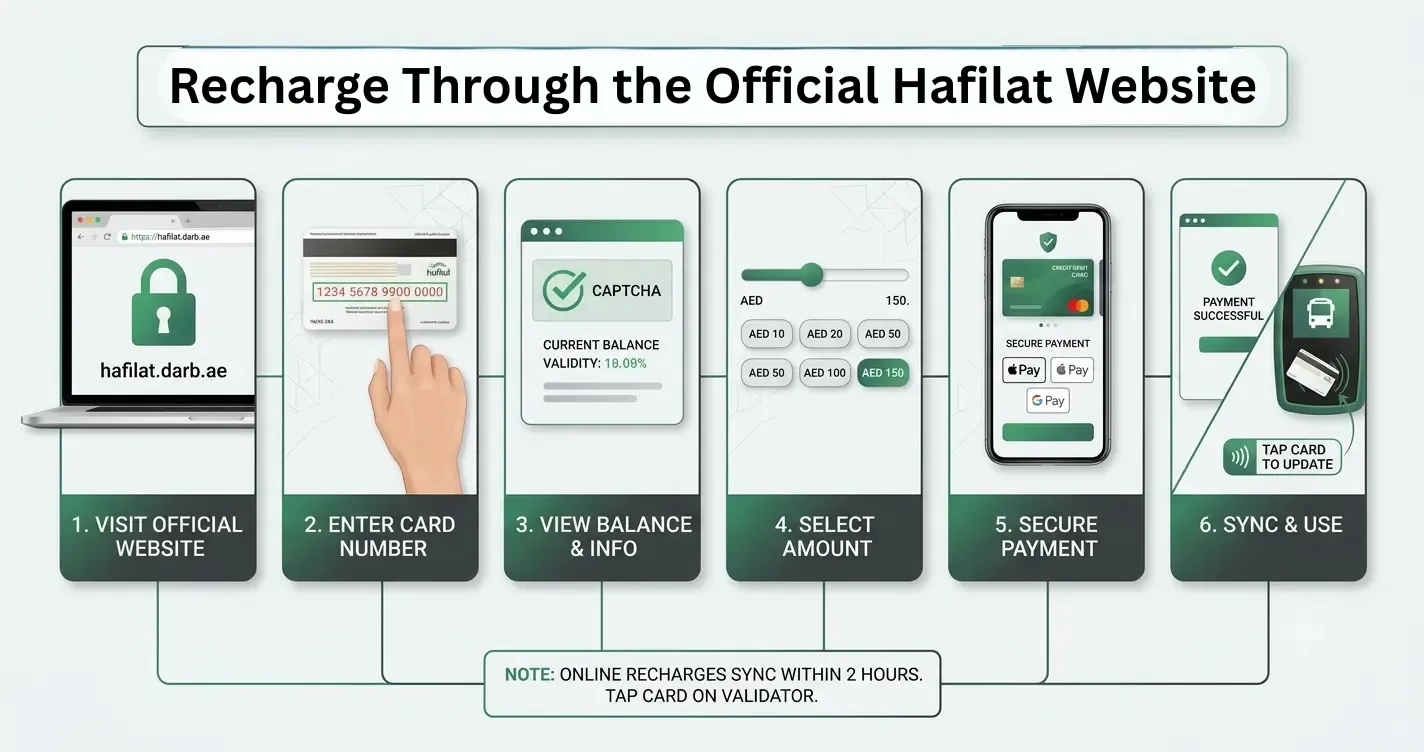
This is the fastest way and works in any desktop or mobile browser. Here’s what you do:
- Visit hafilat.darb.ae. Before you type anything, check for the padlock icon in the address bar.
- Click on Recharge Card.
- Type in your 16-digit card serial number exactly as it appears on the back of your card.
- If you see a CAPTCHA, please complete it. Your card validity and current balance will be shown on screen.
- Choose a recharge amount. The site has set increments, starting at AED 10, and you can top up until your stored balance is AED 150.
- Pay with a credit or debit card, Apple Pay or Google Pay.
- save/screenshot the confirmation page
The first time, it gets almost everybody. The balance does not show up immediately on your physical card. Online recharges can take up to 2 hours to sync with the card system. You just tap your card on a validator in the bus or on a station machine to make the update go through. Plan ahead rather than recharging at the bus stop with the bus already approaching.
Method 2: Recharge Using the Darbi Mobile App
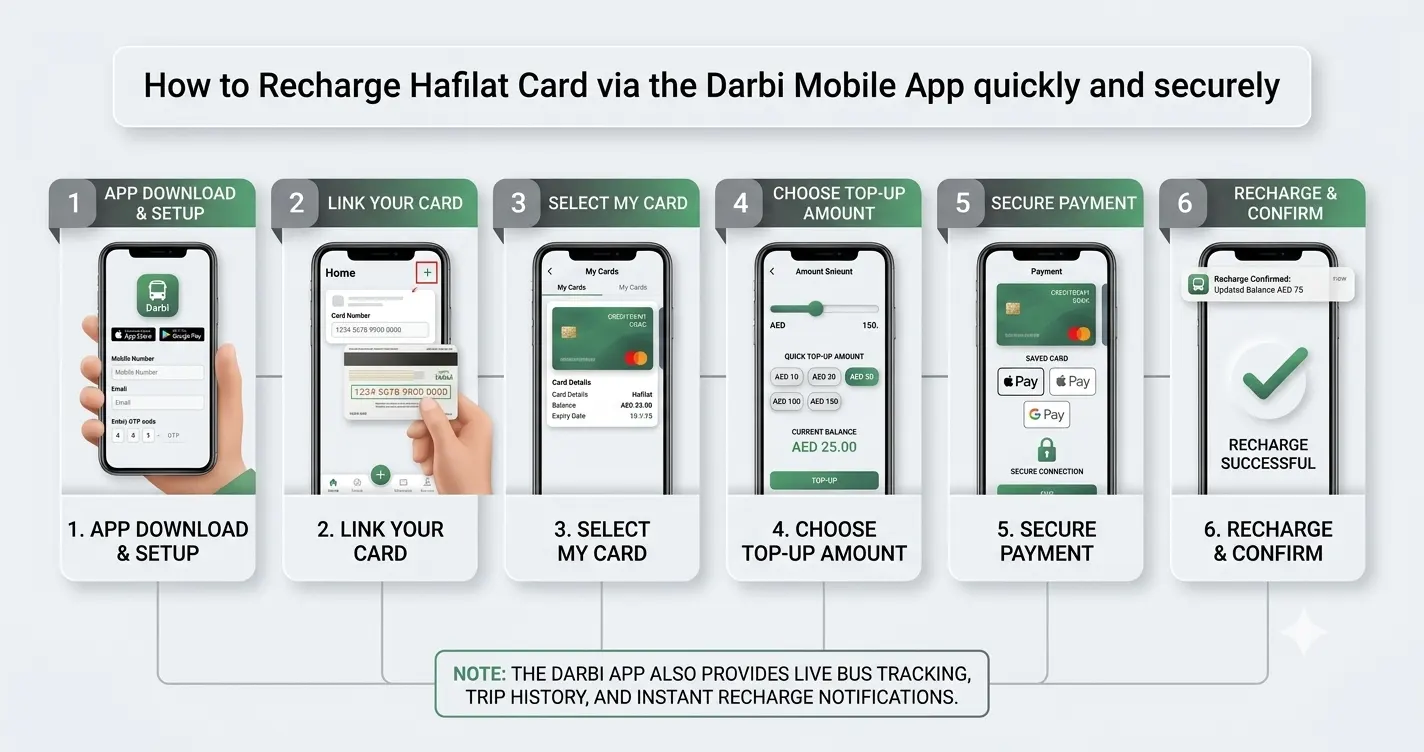
The Darbi app by Abu Dhabi Mobility is the best option if you recharge often. Once your card is saved, future top-ups are seconds. You get live bus tracking, trip history, and recharge notifications, all in one place.
App Setup
- Download Darbi from Google Play or the Apple App Store. Find the official app by Abu Dhabi Mobility; avoid anything that looks unofficial.
- Register using your mobile number and email, then verify with the OTP sent to your phone. Do not share this OTP with anyone.
- Tap the plus icon on the home screen and then select Recharge Hafilat Card.
- Enter the 16-digit serial number, then click Add Card.
Re-charge
- Open My Cards and choose your card of Hafilat.
- Pick your recharge amount and choose the option.
- Pay with a saved card, Apple Pay, or Google Pay.
- Once the recharge is done, you will get a notification from the app.
The card you linked also serves as a balance checker. You can check your current credit, expiry date, and recent trips at any time in the app without re-entering the serial number.
Method 3: Recharge Through the Payit Wallet
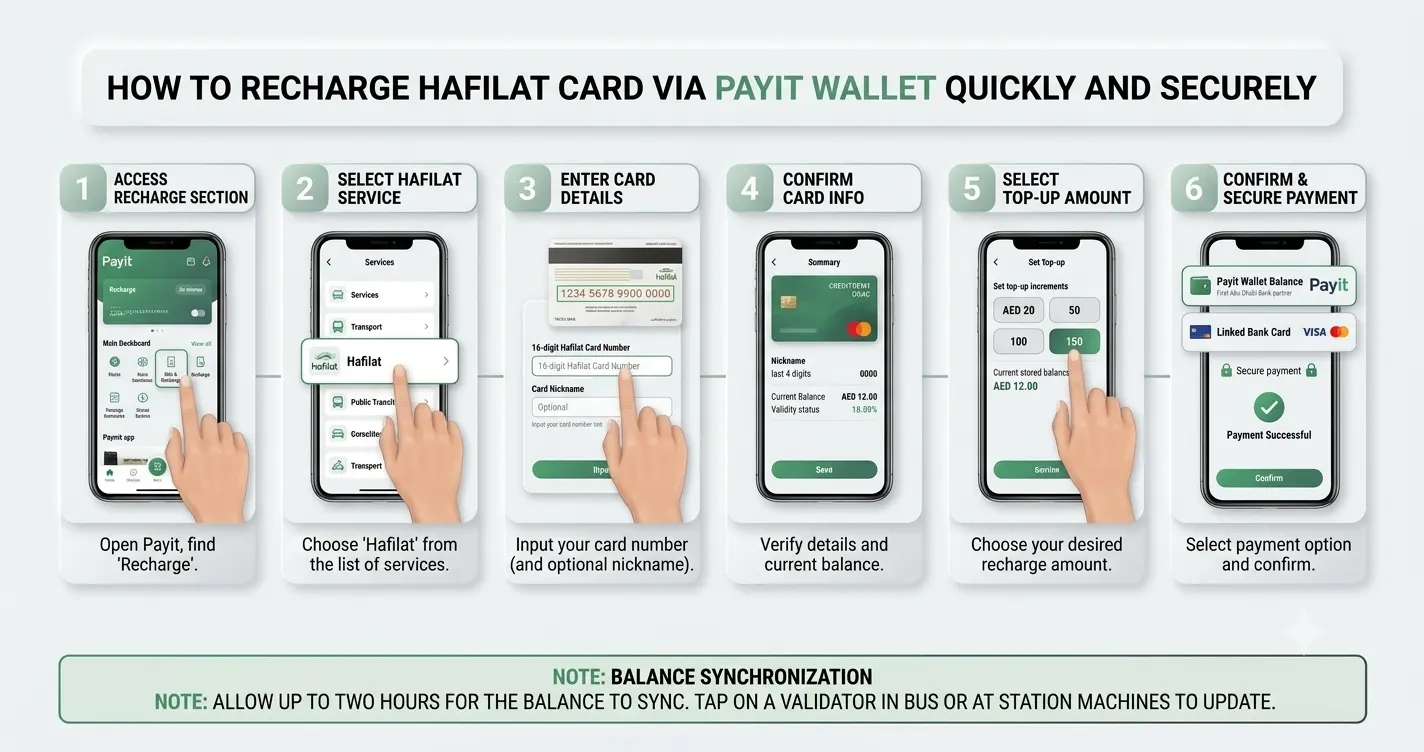
First Abu Dhabi Bank’s digital wallet, Payit, is a direct partner for Hafilat top-ups. If you already use Payit for bills or transfers, you won’t need to install another app. For instance, if your salary lands on a FAB card, you can do a quick FAB balance check online before topping up, so you know exactly how much you can spare for your commute.
- Open Payit and click on the bill and recharge section.
- Choose Hafilat from the list of service providers.
- Enter your 16-digit card number. You can also nickname the card so it can be saved for next time.
- Select your amount and pay from your wallet balance or a bank card you’ve linked.
Payit sometimes has cashback offers on transport recharges, so it’s worth verifying that you top up every week. Please allow up to two hours for the balance to get to your card on the website.
Method 4: Recharge via TAMM
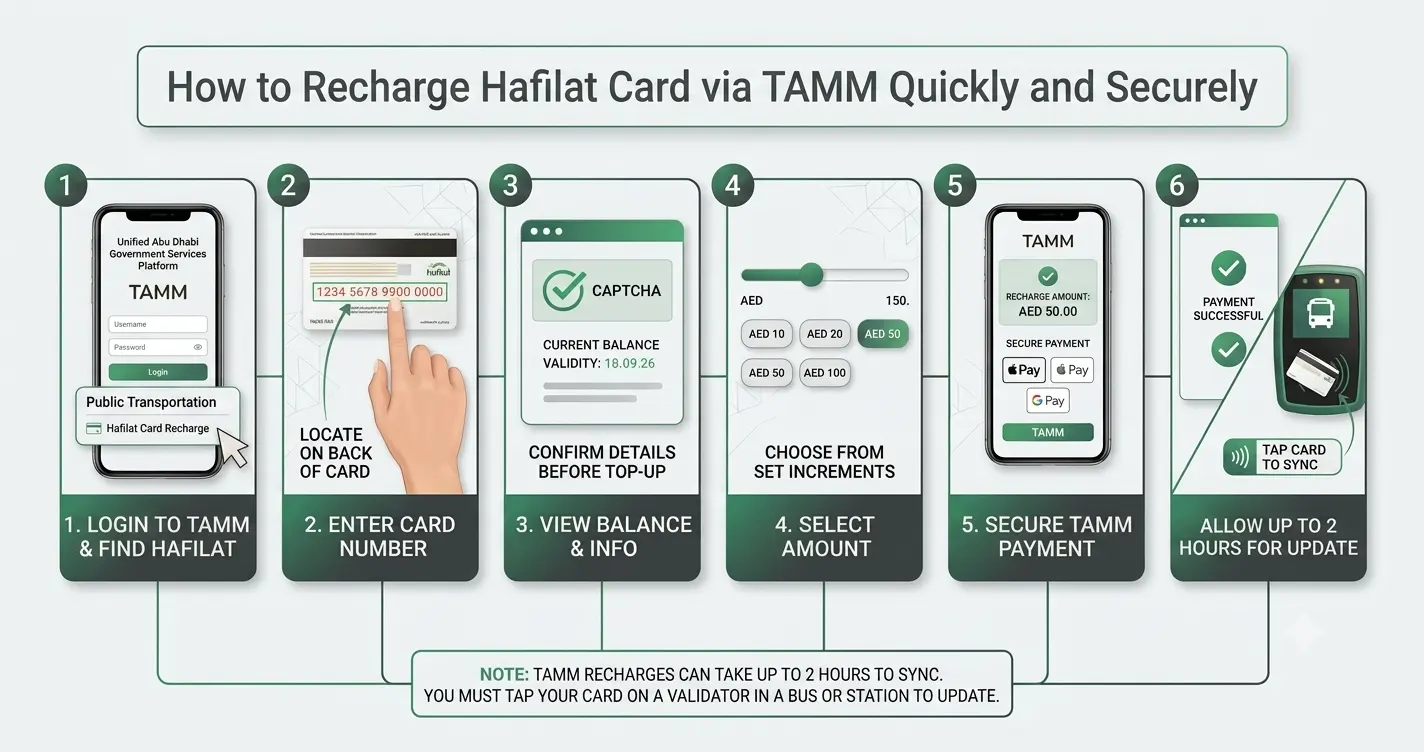
TAMM is the unified government services platform in Abu Dhabi, and it also hosts a Hafilat recharge service. If you already have a TAMM account for other government transactions, you can top up there without creating anything new. The steps are the same as on the DARB website: input your card number, choose the amount, and pay online.
Comparison: Which Online Method Should You Use?
| Method | Best For | Payment Options | Balance Update | Account Needed |
|---|---|---|---|---|
| hafilat.darb.ae website | One-off recharges | Debit/credit card, Apple Pay, Google Pay | Up to 2 hours | No |
| Darbi app | Frequent commuters | Card, Apple Pay, Google Pay | Up to 2 hours, with notification | Yes |
| Payit wallet | Existing Payit users | Wallet balance, linked card | Up to 2 hours | Yes (Payit) |
| TAMM platform | Users with a TAMM account | Card payments | Up to 2 hours | Yes (TAMM) |
For most people, the website is fine for an occasional top-up. Daily commuters should link their card in the Darbi app once and never think about it again.
Offline Alternatives (When You Need the Balance Immediately)
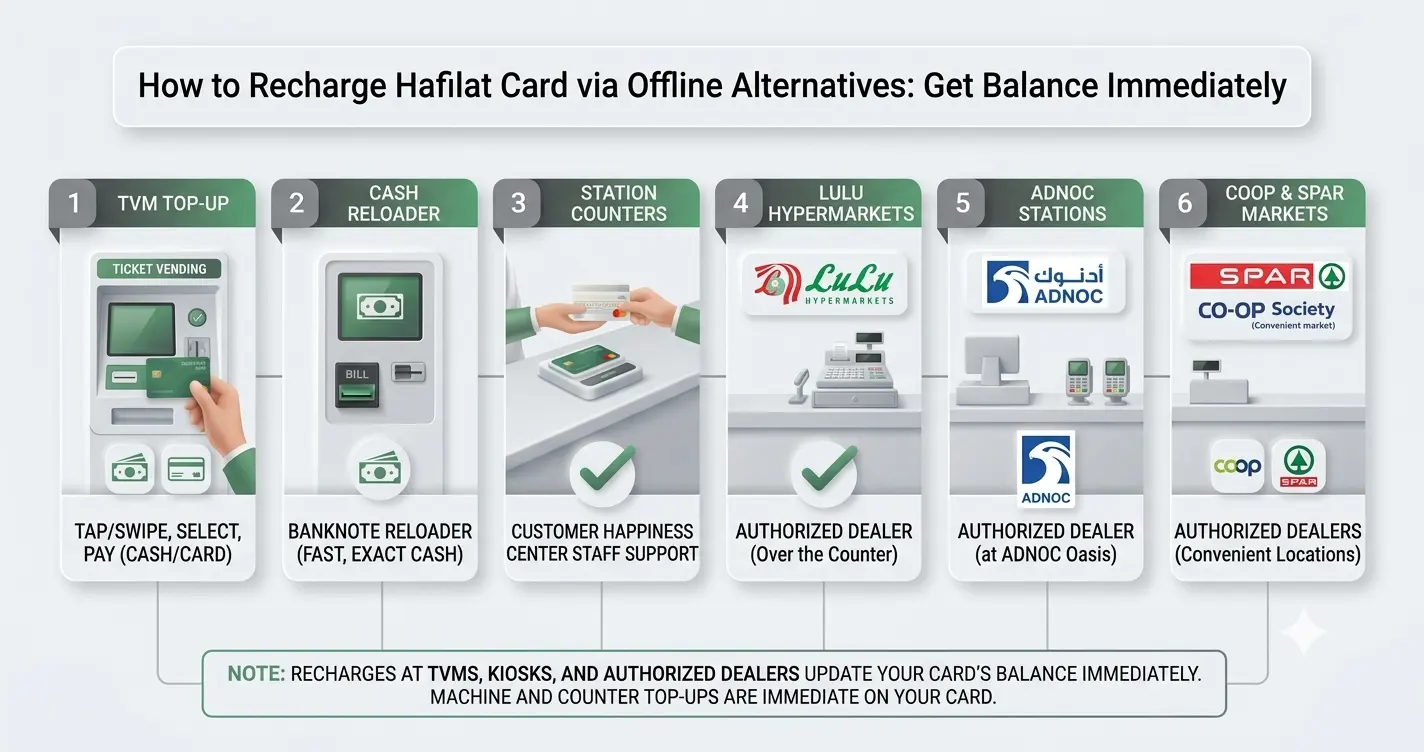
Sometimes, two hours is too long to wait. Machine and counter recharges are IMMEDIATE on your card, so keep these in your back pocket:
- Ticket vending machines (TVM’s). Available in shopping centers, bus stations and at major stops. Tap or swipe your credit card, select an amount and pay with cash or bank card. The balance is updated immediately.
- Banknote reloader kiosks. Cash-only machines at bus shelters, malls and hospitals. Fast, but they do not give change, so take the exact amount.
- Customer Happiness Centers. At major bus stations, staff can top up your card immediately. You also come here for replacements or re-activation.
- Authorized Dealers. Hafilat recharge can be availed over the counter at Lulu Hypermarkets, ADNOC stations, SPAR and many cooperative societies. Useful when you are shopping, though the credit may take longer to show than a machine recharge.
The Rules That Matter: Balance Limits and Validity
The Hafilat confusion largely comes from two rules, neither of which is obvious from the card itself.
- The AED 150 limit. You can load a maximum of AED 150 on your card at any one time. If a recharge would push you past that limit, the system won’t accept it. Frequent Al Ain or intercity travelers sometimes hit this ceiling, so instead recharge in smaller amounts more often.
- The 3-month validity period. Stored credit is valid for three months from the date of last recharge. If you don’t use the card in that time, the balance may expire, and you might have to reactivate the card at a customer service center. There’s an easy fix. You can either take a bus or tap the card on a recharge machine at least once every three months. Every new recharge resets the timer.
You can top up with a minimum of AED 10, and you want to keep the card to a floor of roughly AED 10 so a tap never fails mid-journey.
Troubleshooting: Common Recharge Problems and Fixes
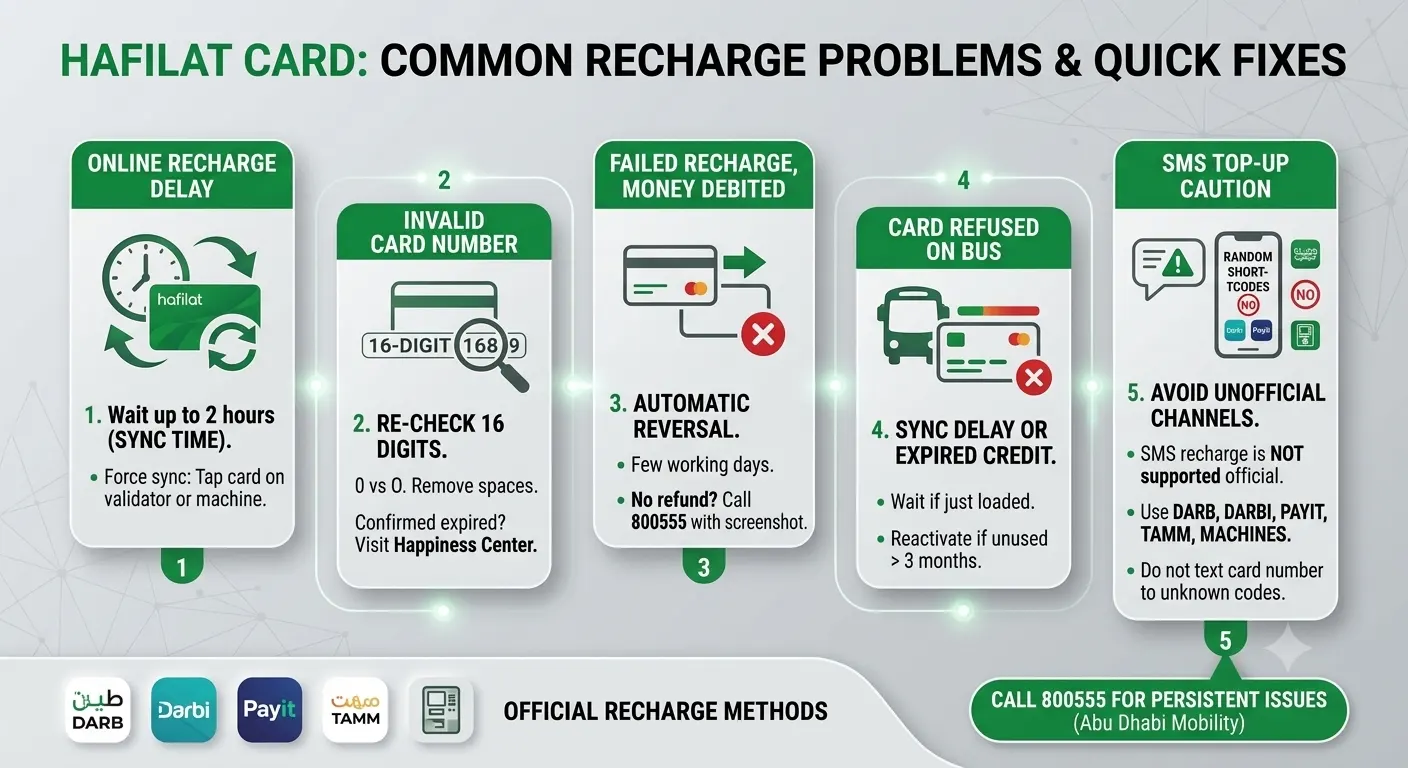
Check out the common recharge problems you may face and quick fixes for them.
Balance is not reflecting following an online recharge. This is the commonest complaint, and in the majority of cases there is nothing wrong. Top-ups online take up to 2 hours to sync. To force the update, tap your card on a bus validator or station machine. If the money is not received after two hours, keep your payment confirmation and call Abu Dhabi Mobility 800555.
The website says the card number is not valid. Again, check the 16 digits on the back of your card. Look for 0 vs O . Remove the spaces . If it still doesn’t work, the card may have expired or been deactivated, which can be confirmed by a Customer Happiness Center.
The recharge failed, but the payment went through. Failed transactions are usually reversed automatically within a few working days.If the refund does not show, save a screenshot of the payment and the error and call 800555.
The card was refused on the bus with a balance on it. If you loaded the balance online a few seconds ago, it probably has not synced. If the card has not been used for more than three months, the credit may have expired, and the card will need to be re-activated.
A word of caution on SMS top-up. Some unofficial websites say you can top-up or check your balance by text message. SMS recharge service is not supported by official guidance, so please use the DARB website, Darbi app, Payit, TAMM or physical machines. Don’t click anything that asks you to text your card number to some random shortcode.
Practical Tips From Regular Commuters
There are a few habits that make life with a Hafilat card noticeably smoother.
- Don’t charge at the stop; do it the night before. The two-hour sync window means a morning top-up might not get there before your bus does.
- Keep AED 15 to 20 buffer on the card. Zone-based fares mean longer routes like Abu Dhabi to Al Ain cost more, so a near-zero balance is risky.
- Even if you top up somewhere else, keep your card in your Darbi app. It provides you with a free balance check and trip history at a glance. It also helps you to estimate how much to load each month.
- If you ride the bus every day, figure out the cost of a monthly pass. You can travel around the city unlimited for a flat fee, which is often more cost-effective than recharging every time you want to take a trip. The pass can be activated and renewed through the same channels.
- For short stays, it is better to have a small balance on a temporary card than to load it close to the AED 150 cap. Unused credit expires after 3 months, and there is no point in leaving money on a card you won’t use again.
Final Thoughts
There are three solid ways to recharge a Hafilat card online. The hafilat.darb.ae website if you just need a quick top-up, the Darbi app if you’re a regular commuter, and Payit if you already live in that wallet. Keep in mind the two digits that rule everything: AED 150 as the cap and three months as the validity window, and recharge a little before you actually need it. Do that, and the card becomes a blur in the background of your daily commute, where it belongs.
Frequently Asked Questions (FAQ)
What is the minimum amount to recharge a Hafilat card?
AED 10. You can add funds to it as many times as you want until the value stored on the card reaches its maximum value of AED 150.
How long does an online Hafilat recharge take to reflect?
Two hours or so. The machine and customer service counter can do instant recharges, so use those if you need credit right away.
Can I recharge my Hafilat card with Payit?
Yes. Open the Payit app, search for Hafilat under bills and recharge, input your 16-digit card number, and pay from your wallet or linked card.
Does Hafilat balance expire?
Stored credit is valid for 3 months from the date of your last recharge. You may use the card or top it up within that period to keep the balance active. If your balance has expired, you may have to go to a customer service center to have it reactivated.
How do I check my Hafilat balance online?
Enter your card serial number at hafilat.darb.ae or link your card to the Darbi app to view your balance, expiry date, and recent trips at any time.
Who do I contact if a recharge goes wrong?
Have your payment confirmation ready and call Abu Dhabi Mobility on 800555. Customer Happiness Centers at major bus stations can also assist with card issues in person.